Ah, the notorious Xbox Storage Expansion Card. It is easily one of my least favorite parts of the Xbox Series, especially when you consider you cannot just use a standard NVMe drive like you can on the PlayStation 5.
Instead, Xbox relies on its proprietary solution, and that remains a sore spot, particularly given the price, which still sits firmly in triple digits.
If you did end up buying one and no longer use your Xbox, there may be a way to get some value back. A user on Reddit, u/Dramatic-Shape5574, recently discovered that a cheap PCIE adapter can let you use that expansion card as storage on a PC.

Now, as I said, or rather moaned earlier, the Xbox Series storage expansion solution is far from ideal. While it is more practical and less awkward than the PlayStation 5 approach, it significantly limits your options, and the price markup over a standard NVME is noticeable enough that some people simply cannot justify it.
With that said, if you are an avid gamer, these cards can still be a worthwhile investment. They are expensive, so it would be a shame for that spend to go to waste, especially if you have moved over to PC for your gaming.
That is where this comes in. Reddit user u/Dramatic-Shape5574, posting in the r/Xbox community, shared how a relatively inexpensive PCIe adapter can enable full use of an Xbox Expansion Card on PC.
The adapter itself is a CFexpress Type B card reader, and based on their testing, the speeds come in at around twice as fast as a typical SATA SSD.
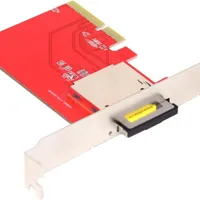
Now, keep in mind you will need a spare PCIe expansion slot in your PC for this to work.
If you do have one available, though, this feels like a great way to make use of an Xbox expansion card you might have lying around.
If this ends up helping you out, be sure to let me know in the comments as I’d love to know how you’ve got one if you try it for yourself!

Join us on Reddit at r/WindowsCentral to share your insights and discuss our latest news, reviews, and more.