


I reviewed the JSAUX FlipGo Horizon Pro back at the start of November and found it to be an awesome accessory that improved my workflow on a laptop.
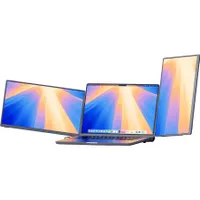
It's a monitor extender that provides two 15.6-inch displays that can be oriented in portrait or landscape mode. They can even be stacked on one side if that's preferred.
The JSAUX FlipGo Horizon usually sells for $499.99, but it's currently on sale for $459.99 at Amazon when you click the coupon before checkout. If you order today, it should arrive before Christmas.
What's so special about the FlipGo Horizon Pro?


I tend to have multiple windows and browser tabs open, whether I'm working or I'm in the middle of a creative project.
As such, it's a whole lot more convenient and efficient for me to have more than one monitor when I'm using my laptop. That's where the FlipGo Horizon Pro comes in handy.
The FlipGo Horizon Pro facilitates a wide range of uses with its ability to hold two additional monitors at either landscape or portrait orientation, so it can fit my needs whether I want a long monitor for typing or a wide one for creative designs.
This accessory even supports stacking the monitors in landscape mode, which I find useful when I'm working in Photoshop. On top of that, I can have it display one monitor at a time, which I find is great for gaming on the go.

For additional convenience, the Snap Stand Pro stand that goes behind your laptop features a few ports, so I can plug in any additional accessory or even an Ethernet cable for wired internet. In other words, the stand also serves as a docking station.
In addition to the stand and two displays, this purchase gives you universal adapters, an outlet charger, four USB-C cables, two mini HDMI cables, the adjustable Snap Stand Pro, instructions for how to use the stand, a phone stand adapter with MagSafe attachment, manuals, two hex keys, a carrying case for just the monitors, and then a larger carrying case so you can tote everything around.
So, if you like changing the orientation of your monitors or want to add more screens to your laptop to improve your workflow, I highly recommend grabbing the JSAUX FlipGo Horizon Pro while it's on sale for $459.99 at Amazon.
Enjoy our content? Make sure to set Windows Central as a preferred source in Google Search, and find out why you should so that you can stay up-to-date on the latest news, reviews, features, and more.
FAQ
What size and resolution are the JSAUX FlipGo Horizon Pro monitors?
This accessory comes with two 15.6-inch displays that have a 16:9 ratio. They can both reach up to 1920x1080 and 60Hz.
What ports does the JSAUX FlipGo Horizon Pro stand have?
There are two USB-C Gen 2 ports, three USB-A 3.1 Gen 1 ports, a USB-C PD port, a USB-C upstream port, and an Ethernet port on the back of the Snap Stand Pro that comes with the FlipGo Horizon Pro.
Is the FlipGo Horizon Pro worth buying?
Yes, if you think you'd like the flexibility of being able to change the orientation of your portable monitors . It offers a sturdy build, comes with everything you need to connect to your laptop, and serves as a dock in addition to a monitor extender.
Is it worth it to get a portable monitor?
If you tend to travel around a lot for work or would benefit from having more screens when working around your home, then yes, a portable monitor can help you be more efficient by allowing you to see more programs or browsers at once.
Is JSAUX a good company?
I've personally bought and used several JSAUX devices over the years. As with any company, some products are better than others, but I've found that this company tends to produce reliable and quality devices.

Follow Windows Central on Google News to keep our latest news, insights, and features at the top of your feeds!

