


Mini PCs keep getting better, and their popularity, thanks to competitive pricing and strong performance, keeps rising. This has sparked a bit of a flood in the mini PC market, and it's now harder than ever to figure out which mini PC you should actually buy.
My top pick out of all the mini PCs we've reviewed at Windows Central — totalling hundreds of hours of testing — is Geekom's Mini IT13. Not quite what you're looking for? I've included a bunch of other top-rated mini PCs we've reviewed favorably, with a focus on a wide range of users.
February 5, 2026: I've added the Lenovo IdeaCentre Mini x and otherwise reordered some of my picks after new reviews, but the top pick for most people remains the same. — Cale Hunt
TL;DR: Summarizing our findings
Why you can trust Windows Central Our expert reviewers spend hours testing and comparing products and services so you can choose the best for you. Find out more about how we test.
- Mini PCs make great alternatives to full-size desktop PCs these days, and most Windows users can save a lot of space (and money) with one of these top-rated options.
- Best overall — Geekom Mini IT13: A great price, strong Core i9 performance, a healthy range of ports, and support for up to four external monitors make this our top choice for most Windows users.
- Budget pick — Beelink EQR6: The most affordable option on the list can nevertheless offer a steady PC experience for a lot of users.
- Mid-range pick — Geekom A8 Max: This is more upper mid-range than anything, and it's more affordable than its A9 Max sibling. Check it out if you don't mind not having AMD's Ryzen AI 300 chips.
- Best gaming — Geekom A9 Max: The new integrated GPU in the Ryzen AI 300 CPU can power modern games at respectable frame rates, making this my top choice for anyone who wants to game.
- Best AI PC — HP Z2 Mini (G1a): AMD's Ryzen AI Max Pro chips are the key to this PC's success, and top-tier configs can deliver AI performance similar to what an RTX 4090 offers thanks to a shared memory setup.
- Best Snapdragon — Lenovo IdeaCentre Mini x: Lenovo's new Snapdragon-powered mini PC should be your first choice if you'd like to access Copilot+ AI tools in Windows 11.

I love building and testing PCs, and I've tinkered with a fair share of mini PCs along the way. With key points like cooling, performance, upgradeability, and price in mind, I've narrowed things down to six top picks that will appeal to most users.
Best overall mini PC for most users

My recommended Geekom IT13 configuration:
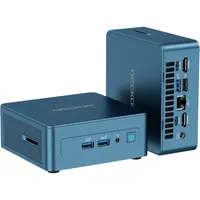
Geekom's IT13 holds the top spot thanks to a truly compact design, an included VESA mount (for attaching it to the back of your monitor or desk), excellent port selection (with support for up to four external monitors), and upgradeable RAM and SSD.
Former Windows Central Editor Rebecca Spear reviewed the Geekom Mini IT13, stating:
"The Geekom Mini IT13 is small enough to tuck under a monitor or attach behind one for a minimalist computer setup. Even with its compact form factor, it allows for some memory and storage upgradability, is packed with ports, and can support up to four monitors running at 4K. It's not a powerhouse, but it offers solid performance that makes it a great alternative to laptops or desktops, whether you need something for work, school, or personal use."
The Geekom Mini IT13 is equipped with an Intel Core i9-13900HK CPU with 14 cores and 20 threads, and it includes a 6-core integrated Intel Iris Xe GPU. The $749 model I'm recommending comes with 16GB of DDR4 RAM and a 1TB M.2 PCIe 4.0 NVMe SSD.
👀 Read our full Geekom Mini IT13 review
Best budget mini PC

My recommended Beelink EQR6 configuration:
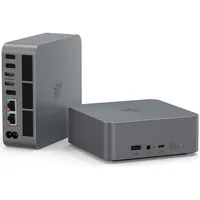
Beelink's EQR6 is usually available for about half the price of my top pick, and it was previously the top overall choice. Windows Central Senior Editor Zac Bowden reviewed the Beelink EQR6, saying:
"Overall, the Beelink EQR6 is an excellent all-rounder mini PC that's very capable when it comes to productivity workflows and light video and photo editing. It features a clean design and is small and quiet enough to fit on pretty much any desk in any environment and not be an ear or eyesore."
Port selection is generous, with dual LAN ports, dual HDMI, four USB-A, USB-C, and a 3.5mm audio jack. It would be nice to have more USB-C, but the dual HDMI ports make it easy to build a multi-monitor setup.
The EQR6 keeps its cool under load, and the built-in PSU means you don't have to deal with extra bulk along the power cable. As long as you aren't looking for a mini PC to focus on gaming, this should be an easy recommendation.
👀 Read our full Beelink EQR6 review
Mid-range pick

My recommended Geekom A8 Max configuration:
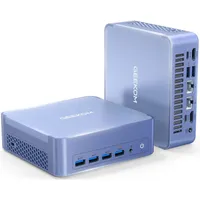
Those in search of a more powerful PC should consider Geekom's A8 Max. While it lacks a discrete GPU, it includes an AMD Ryzen 9 8945HS CPU with AMD Radeon 780M integrated GPU alongside 32GB of DDR5 RAM and a 2TB M.2 PCIe 4.0 NVMe SSD.
The integrated graphics are enough to handle light gaming, and while you'll hear the fans under load, there wasn't any throttling while testing the PC.
Windows Central Senior Editor Harish Jonnalagadda reviewed the Geekom A8 alongside its A7 sibling, stating:
"Having used the A7 and A8 extensively, the only limitation I can think of is that they have a solitary M.2 slot. There isn't much else that is missing on either model, and they both deliver standout performance in day-to-day productivity tasks as well as demanding image and video editing workflows."
There's only one M.2 slot, but at least models come with 2TB of storage for a very strong start.
Wi-Fi 6E and Bluetooth 5.2 come standard, but there's also a 2.5Gbps Ethernet port for a wired connection. Other I/O includes multiple USB-C, USB-A, and HDMI 2.0 with support for up to four external displays.
👀 Read our full Geekom A8 review
Best gaming mini PC


My recommended Geekom A9 Max configuration:
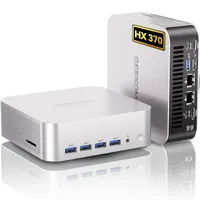
Some mini PCs are available with a discrete GPU inside for gaming, but those generally cost a lot more than a standard mini PC with integrated graphics.
In the case of the Geekom A9 Max, you can spend about $1,299 on a mini PC that runs even Cyberpunk 2077 at 60 FPS and above.
The excellent performance is thanks to AMD's Ryzen AI 9 HX 370 CPU, featuring an integrated Radeon 890M graphics chip. Windows Central Senior Editor Richard Devine reviewed the Geekom A9 Max favorably, focusing on its gaming and AI capabilities.
After increasing the alloted RAM amount shared with the GPU to 8GB (it comes at 2GB or 4GB as standard), Devine was able to run a 20-billion-parameter LLM and enjoy 1080p gaming at 60+ FPS.
Devine states in his review:
"For most people, most of the time, this little box is all the PC they would ever need. It can game, it can tackle AI workloads, it's packed with enough of the latest tech that it won't be outdated for a long time to come."
👀 Read our full Geekom A9 Max review
Best AI PC

My recommended HP Z2 Mini (G1a) configuration:
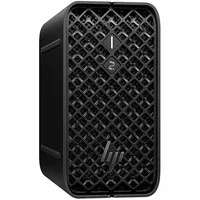
AMD announced its Ryzen AI MAX platform with the hook that the chips are faster than an RTX 4090 when it comes to local AI performance. How is that possible? It all comes down to available memory, which the integrated GPU can tap (up to 96GB at a 256GB/s bandwidth) to help with local AI acceleration.
These chips and their awesome AI potential are available in HP's Z2 Mini (G1a), a stylish mini PC with a generous selection of ports (including dual Thunderbolt 4), Wi-Fi 7, and a three-year license to HP's Wolf Pro Security.
Former Windows Central reviewer Zachary Boddy reviewed the HP Z2 Mini (G1a), remarking:
"HP's Z2 Mini (G1a) is far more PC than most people need, all squeezed into a tiny package. It's absurdly powerful and capable, especially when it comes to running local AI models, and is smartly designed for the most demanding enterprise customers. It's a different class of workstation for those who need it, and HP absolutely knocked it out of the park. Just mind the price."
No, the latest Z2 Mini does not come cheap, but there are plenty of configs available. Better yet, they're usually on sale with a fairly significant discount.
👀 Read our full HP Z2 Mini (G1a) review
Best Snapdragon mini PC

My recommended IdeaCentre Mini x configuration:
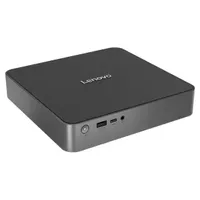
Lenovo's IdeaCentre Mini x is the company's "first true Mac Mini competitor," according to Windows Central Senior Editor Zac Bowden, and a big part of its appeal lies in the use of a Snapdragon X or Snapdragon X Plus chip.
The PC is a "multitasking powerhouse," and it's particularly good at handling office-based workloads, web browsing, TV or movie streaming, and even some light Photoshop. Just don't expect it to deliver strong gaming performance.
The tiny PC works horizontally or vertically thanks to an included stand, and there's a varied assortment of ports on the front and back, including HDMI 2.1, USB-A, USB4, DisplayPort 1.4, and Ethernet.
You can configure the PC with up to 32GB of LPDDR5x RAM and a 1TB SSD, and it comes with the latest Wi-Fi 7 with Bluetooth 5.2 for wireless accessories. The PC runs cool and quiet, and its Copilot+ capabilities make it a solid choice for anyone interested in Windows 11 AI implementations.
👀 Read our full Lenovo IdeaCentre Mini x review
Honorable mentions


Just because these mini PCs didn't make it into the main list doesn't mean they aren't worth consideration.
- Geekom GT1 Mega: Geekom's GT1 Mega features Intel Core Ultra (Series 1) chips, lots of RAM and storage, and a generous port layout. Great if you need some extra power for multitasking or creative software. 👉 Read our full Geekom GT1 Mega review
- HP EliteDesk 8 Mini (G1a): HP's mini PC focuses on security, performance, and versatility for professionals, but there's no reason the average Windows users can't take advantage of those same features, especially when there are such deep discounts available most of the time. 👉 Read our full HP EliteDesk 8 Mini (G1a) review
- Beelink GTi13 Ultra: Beelink's GTi13 Ultra is a fairly straightforward mini PC with upgradeable RAM and storage alongside the Intel Core i9-13900HK CPU. It's a capable system standing on its own. However, the big attraction here is its PCIe 8x hookup designed for use with desktop GPUs via Beelink's proprietary docking station. 👉 Read our full Beelink GTi13 Ultra review
How to test mini PCs at Windows Central

Mini PCs get treated the same way we treat all review hardware, in that we essentially adopt the device for regular use.
This allows us to get a good idea of how a regular buyer's experience will go, taking into account setup, size, port selection, and any additional features with which you'll immediately come into contact.
Many of our laptop performance testing guidelines apply here, since most mini PCs rely on laptop-class hardware to fit into such a small chassis.
👉 Related: How we test and review laptops at Windows Central
We put the CPU through synthetic benchmarks tests like Geekbench, Cinebench, CrossMark, PCMark, and Handbrake, while testing the SSD with CrystalDiskMark and the GPU with 3DMark.
The synthetic benchmarks, along with our own observations while using the PC regularly, help us convey the level of performance you can expect from the PC in question.
From there, it's a matter of putting everything together and checking to see how well the product in question measures up against other hardware we've recently tested (performance, features, pricing, etc.).
How to choose the best mini PC for you

Despite their size, all these mini PCs are capable Windows computers that are attractive alternatives to the best Windows laptops.
With options for general use, professional environments, and gaming, all types of users should find something suitable.
My top choice right now is Geekom's Mini IT13. It's a super compact PC and it comes with a VESA mount for additional space saving.

The model we tested at Windows Central is the one I recommend to most users. It has a 13th Gen Intel Core i9-13900HK CPU, 32GB of DDR4 RAM, a 2TB M.2 PCIe 4.0 NVMe SSD, and Wi-Fi 6E. You can find it for about $749 at Amazon.
It has a healthy selection of ports, support for four external monitors, and its RAM and storage can be upgraded after purchase. There's enough power to run lighter games and some creative programs, but don't expect it to be a heavyweight gaming machine.
Beelink's EQR6 remains a great option thanks to its attractive starting price of around $399. It has an AMD Ryzen 5 6600U CPU, 24GB of LPDDR5 RAM, AMD Radeon 680M integrated graphics, and a 512GB M.2 PCIe 4.0 NVMe SSD. That's a lot of power for the asking price, and it should suit anyone from productivity masters to those who enjoy light gaming.
If you'd like the most AI performance possible, you'll want to have a look at HP's Z2 Mini (G1a). Available with up to AMD's best AI chip that rivals the RTX 4090 in terms of AI performance, baseline prices generally start at about $1,369 when on sale.
If you'd rather land a mini PC that's made for gaming, the Geekom A9 Max is a top choice that starts at about $1,299.
Mini PC FAQ
What are some of the downsides that come with a mini PC?
Mini PCs are essentially what you get when you take a laptop's performance hardware and place it into a tiny box.
Gone are the keyboard, touchpad, and display; here are upgradeable storage and memory, more ports, and a cheaper price.
Because mini PCs use laptop performance hardware, they won't measure up to the power from a full-size desktop using desktop-class parts.
This is most important if you're a PC gamer, designer, or creator who relies on intensive software. Most mini PCs are more than powerful enough to handle standard productivity work, web browsing, and light gaming.
What's the best way to use a mini PC?
Mini PCs are best used in a desktop situation where space is limited.
Sure, you could truck one around with you in a backpack, but you'll have to add the power supply, monitor, and accessories when you sit down. That's why laptops are the better choice for those on the go.
Because mini PCs are so small, they're often used by businesses (they're super popular in kiosks and other small stands) for discrete computing.
At home, mini PCs excel at being your TV-attached media center without all the bulk of a full-size tower.
Can I game on a mini PC?
Yes, many mini PCs are capable of playing lighter games thanks to modern CPUs with relatively potent integrated graphics.
Check out the Geekom A9 Max if you're interested in gaming on a mini PC and don't mind a lack of discrete GPU.
What is a NUC when talking computers and mini PCs?
Next Unit of Computing (NUC) is something that the tech company Intel specifically named its mini PCs. It's also important to know that Intel NUCs can also refer to the company's small motherboards customizable chassis, and certain laptop kits.
Still, in most situations, NUC means mini PC. It's also worth noting that although Intel was the original creator and manufacturer of the Intel NUC, that Asus is now the company that sells them.
What is the point of a mini PC?
Mini PCs are extremely small and compact computers compared to laptops and desktops, so they are easier to fit into limited spaces.
What's more, they also tend to cost a whole lot less than laptops and desktops, making them far more affordable while still being able to handle office tasks and even some gaming depending on the configuration of the mini PC.
Is a mini PC better than a laptop?
That really depends on what you intend to use the mini PC or laptop for. Depending on the configurations, both types of devices can be used to handle office work, a variety of programs, and even some gaming.
Laptops are easier to take on the go since a monitor is included, but mini PCs don't take up much room and they tend to be more affordable.

Follow Windows Central on Google News to keep our latest news, insights, and features at the top of your feeds!

