
 Windows Central Insider





Pre-built desktop PCs might not be as sleek and portable as laptops, but they remain the best (and often most affordable) way to set up your home or office with a permanent workstation.
No matter if you're tackling homework, small business, gaming, productivity, AI, or streaming, there's a desktop PC for you that we've personally tested.
We've spent hundreds of hours writing countless reviews, and for most people, Dell's Tower Plus Desktop checks the most boxes. I've included 6 top alternatives for different types of users.
May 20, 2026: Our top picks haven't changed, but I've updated prices and retailer information. — Cale Hunt
TL;DR: Summarizing our findings
Why you can trust Windows Central Our expert reviewers spend hours testing and comparing products and services so you can choose the best for you. Find out more about how we test.
- Desktop PCs vary greatly in price, performance, and design: There are a lot of pre-built desktop PCs on the market, and it can be tough to find the right model. My guide aims to solve that problem with PCs focused on general use, gaming, AI workloads, and more.
- Best overall — Dell Tower Plus: Dell's pre-built starts at an affordable price but can be upgraded with hardware that turns it into a gaming PC. A perfect option for most users.
- Best value — Acer Aspire TC-1775: The build quality isn't as good as my top pick, but this PC costs way less and remains a reliable choice for a lot of users.
- Best AIO — Lenovo Yoga AIO 27: The perfect option for those who want a PC and a 27-inch display built into the same sleek package.
- Best gaming — Lenovo Legion Tower 7i (Gen 10): Lenovo's flagship gaming PC has plenty of hardware options to suit new and veteran PC gamers alike.
- Best custom gaming — Maingear MG-1: This is the best way to get your hands on a pre-built gaming PC that feels like it was built at home. Tons of config options available.
- Best mini PC — Geekom IT13: Not much space on your desk? A mini PC like the IT13 is the way to go, and it doesn't cost much, either.
- Best AI PC — HP Z2 Mini (G1a): For AI workloads, the Ryzen AI Max+ PRO chip inside is a great way to go if you don't want a huge PC with discrete GPU costs attached.
Best overall desktop PC


My recommended Dell Tower Plus configuration:
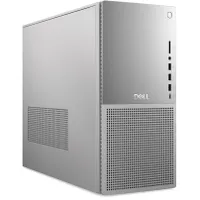
Dell's Tower Plus has massive appeal thanks to its wide variety of configuration options, understated design, and generous selection of ports. Unless you want a PC that focuses primarily on gaming or has a screen built in, the Dell Tower Plus Desktop should be a primary consideration for most PC users.
Even the most affordable units will handle life as the family computer, with homework, productivity, and streaming in mind. In her Dell Tower Plus (EBT2250) review, former Windows Central Editor Rebecca Spear remarked:
"The Dell Tower Plus (EBT2250) might look like a simple desktop, but it offers incredibly powerful performance that can easily keep up with creative, work, school, gaming, and personal tasks. There are plenty of configuration options available, so you can get the exact device for your needs, and each one comes with a healthy range of ports for connecting your various accessories and monitors. Not to mention, it does a fantastic job keeping itself cool without employing overly noisy fans. Seriously, this is one of the very best premium desktops you can get right now."
Prices currently start at about $1,049 at Dell for a model with an Intel Core Ultra 5 225 CPU, integrated graphics, 16GB of DDR5 RAM, and a 512GB M.2 PCIe 4.0 NVMe SSD. However, Dell offers up to a Core Ultra 9 285K CPU, NVIDIA RTX 5080 GPU, 64GB of RAM, and 4TB of SSD storage space.
Most people aren't going to need this level of hardware, but it's there. I'd recommend checking out one of the gaming PCs listed here if you want that high level of performance, as they'll have superior cooling and power hardware.
👀 Read our full Dell Tower Plus (EBT2250) review
Best budget PC


My recommended Acer Aspire TC-1775 configuration:
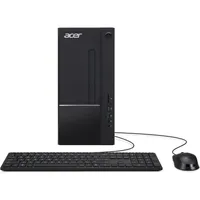
Acer's Aspire TC-1775 is a refreshed version of a long-running series of PCs, one of which I still use to this day as my living room PC for TV control.
As the budget price suggests, you shouldn't expect a premium system; however, in my experience, these PCs hold up well. The case is relatively compact, and it has lots of ports on the front and back.
The PC is equipped with a 14th Gen Intel Core i5-14400 CPU and integrated Intel UHD graphics, with up to 32GB of DDR5 RAM and a 4TB M.2 PCIe 4.0 NVMe SSD. That's more than enough to handle productivity work, email, homework, and other tasks around the house, making it a great option for the family PC. In my Acer Aspire TC-1775 review, I said:
"It's great for casual use, including streaming, homework, email, web browsing, and Microsoft Office tasks. It'll even handle some of my favorite light games like Minecraft, Stardew Valley, and Terraria. Just don't expect the "desktop" performance you'd get from a PC with a discrete graphics card (GPU) inside."
Wireless connectivity is handled by Wi-Fi 6E and Bluetooth 5.3, and there's also an RJ45 Ethernet port on the back for a wired hookup. A mouse and keyboard are included, but they're not of the best quality.
Prices start as low as $572 if you can get away with 8GB of RAM. Otherwise, a 16GB system costs $649 and is the one I recommend.
👀 See our full Acer Aspire TC-1775 review
Best All-in-One desktop PC

My recommended Lenovo Yoga AIO 27" configuration:
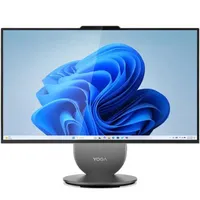
All-in-One (AIO) PCs are ideal for anyone who wants everything they need to sit down and start computing in one sleek package.
Lenovo's Yoga AIO 27" is the best we've recently tested, coming at you with a stable adjustable stand, a swiveling base with built-in wireless phone charging capabilities, tons of ports for all your accessories, and a beautiful 27-inch display.
It's elegant, it's streamlined, and it's great for creators who need some extra performance. Lenovo offers up to an Intel Core Ultra 9 285H CPU with integrated Arc graphics containing eight ray tracing cores, and it's configurable with up to 32GB of LPDDR5x RAM and a 1TB M.2 PCIe 4.0 NVMe SSD.
The screen comes in touch and non-touch flavors with a crisp QHD resolution, hitting about 400 nits of brightness. It has a smooth 120Hz refresh rate, and it hits 99% sRGB color reproduction.
In her Yoga AIO 27" review, former Windows Central Editor Rebecca Spear says:
"The Lenovo Yoga AIO 27" is a great choice for anyone looking for a solid PC that comes with everything they need to get started. There are multiple configurations available, so you can find the option that best fits your needs and price range."
👀 Read our full Lenovo Yoga AIO 27" review
Best gaming PC


My recommended Legion Tower 7i (Gen 10) configuration:
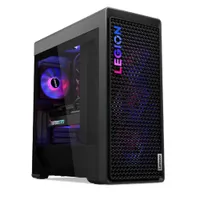
Windows Central's former reviewer Zachary Boddy was so impressed when reviewing the Legion Tower 7i (Gen 10) that they pinned it with an Editor's Choice Award and stated:
"The Lenovo Legion Tower 7i (Gen 10) reuses the same general design, but trims down the dimensions and offers greater performance and cooling than ever before. This is a highly capable desktop PC that's easy on the eyes and even easier to upgrade, but it's mighty expensive — even when you compare it to similarly specced pre-built desktops from other companies."
Enthusiasts will still likely lean into a boutique custom build like that offered by Maingear, but the Legion Tower 7i remains a truly powerful option.
The PC can be configured with up to an Intel Core Ultra 9 285K CPU, NVIDIA RTX 5090 GPU, 128GB of DDR5-5600MT/s RAM, and 2TB of M.2 PCIe 4.0 NVMe SSD storage (along with plenty of 3.5-inch HDDs).
There are lots of options for a more affordable build. Air and liquid cooling options are available, there's plenty of customizable RGB lighting, and it's all packed into a monster 34L case.
There is the potential for DIY upgrades in the future, though Lenovo does use some proprietary parts in the build that might get in the way. If you can live with these shortcomings and love the Legion design, you're going to have a great time gaming on this PC.
👀 Read our full Lenovo Legion Tower 7i (Gen 10) review
Best custom gaming PC

My recommended Maingear MG-1 configuration:
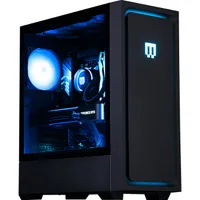
Pre-built custom gaming PCs are often a touchy subject. On one side, you can almost always build your own similar PC for less money if you have the time and patience to gather all the individual parts. It's a great hobby, and knowing how everything fits together makes it easier to perform upgrades and repairs.
On the other hand, letting a boutique builder like Maingear put everything together for you saves time and keeps pricing competitive. I've tested Maingear's desktop PCs in the past, but I most recently got my hands on the MG-1 updated for 2025.
In my Maingear MG-1 review, I remarked:
"I value a clean build that uses standard parts and doesn't come with any surprises, and that's exactly what Maingear's MG-1 delivers. I have a few small nitpicks and you'll have to come to terms with paying a premium, but this is an impressive machine for both veterans and newcomers to PC gaming."
Maingear's PCs are clearly built by technicians who love their job. Cable management is clean, there aren't any proprietary parts that get in the way of upgrades, and you have extensive customization options alongside ready-to-ship prebuilts.
And with Maingear's excellent warranty and in-house customer service at your disposal, that premium doesn't become so steep. As I stated in my review, "Although I love building my own systems, having a PC built to such a high standard arrive all ready to go is a luxury that can't be understated."
Maingear recently launched an updated MG-1 Mk. II case with improved cooling, cable management, airflow, front panel, and more. It's the new standard, and you can get it now from the company's website.
👀 Read our full Maingear MG-1 (2025) review
Best mini PC


My recommended Geekom IT13 configuration:
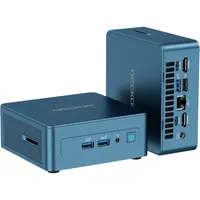
Geekom's IT13 might be small, but it's anything but wimpy. Have limited space on your desk? This is the perfect option for casual use around the home or small office. Thanks to its top Intel Core i9-13900K spec with Iris Xe graphics, it can handle up to four monitors each at a 4K resolution.
As former reviewer Rebecca Spear notes in her Geekom IT13 review, "It's perfect for web surfing, video calls, everyday programs, and cloud gaming. As such, it can easily handle most people's work, school, and personal needs."
Worried about thermals in such a small package? Don't be. Our testing revealed that the PC doesn't overheat under a full load, and its fan noise peaks at about 54.7 decibels. Most of the time, however, the fans are quiet enough that you won't notice them. Opening the case, you have access to RAM and storage upgrades.
Models with an Intel Core i5-13600H CPU, 16GB of RAM, and a 1TB SSD start at $599 at Amazon, making it one of the most affordable options in this list.
👀 Read our full Geekom IT13 review
Best AI PC

My recommended HP Z2 Mini (G1a) configuration:
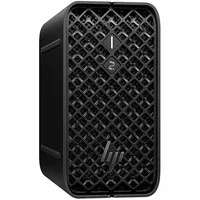
"Absurd, RTX 5090-level AI performance in a tiny package." That's how our former reviewer Zachary Boddy explains the HP Z2 Mini (G1a), a compact mini PC that can indeed be the only PC you need on your desk for AI work.
How does it accomplish this feat while using integrated graphics? AMD's Ryzen AI MAX chips, including the flagship Ryzen AI MAX+ PRO 395, have a 40-core Radeon 8060S GPU. It can "steal" up to 96GB of system memory for VRAM, allowing you to run massive LLMs locally on the GPU.
Here's a telling quote from our HP Z2 Mini (G1a) review:
"At the end of the day, this mini PC excels at creative and AI workflows, exactly as HP designed it to do. This is a heavy-duty enterprise workstation meant for the most demanding users, and it delivers on that front while being backed by HP's impressive enterprise suite, like the HP Wolf Security Pro platform. Yes, you can also play games on it (I enjoyed some Forza Horizon 5), but those considering this mini PC will be doing so with a job in mind."
As expected with a PC containing such a high level of AI performance, it doesn't exactly come cheap when it's not on sale. Prices generally start at about $1,736.
👀 Read our full HP Z2 Mini (G1a) review

I have 20+ years of experience building custom PCs and testing pre-built PCs. I understand where compromises need to be made in the name of convenience, and with the help of our in-depth reviews, I can confidently recommend the right pre-built PC to a wide range of users.
How we test desktop PCs at Windows Central
Each desktop PC that comes our way at Windows Central undergoes the same testing process.
Not only do we analyze performance using benchmarking tools and real-world applications, but we also test airflow, thermals, and noise. Similarly, we also like to check out how easy a PC is to upgrade, which is a key point for many buyers.
Beyond hardware and performance, we know it's important to compare a tested PC against others on the market, in terms of price, power, and design.
How to choose the best desktop PC for you

While you can usually build your own PC for less money, pre-built models have been narrowing the price gap, and you can find a quality device that's relatively affordable considering the hardware inside.
The desktop PC market is massive, and choosing one device to use for the foreseeable future isn't always easy. Choosing the right PC will ultimately come down to your budget, how you plan on using the PC, and what sort of form factor you desire.
For most people, the Dell Tower Plus Desktop will have the right combination of competitive pricing and configuration options. I'd still recommend going with a dedicated gaming PC if you want ultra-performance, but there are plenty of stops along the way that might work well for you.
If you're looking for a full setup right off the bat, Lenovo's Yoga AIO 27" includes a built-in touch display and a battery that allows you to use it anywhere. It's great for full-time use on a desk.
For those with limited space, something like the Geekom IT13 won't take up much room. It nevertheless provides a wide selection of ports, respectable performance, and a competitive price.
If you want to shop on the cheap and prefer a full-size PC, Acer's Aspire TC-1775 remains a great option that I've personally used for years.
Choosing the right desktop PC for gaming
As mentioned, something like the Dell Tower Plus Desktop can be configured with up to an Intel Core Ultra 9 CPU and NVIDIA RTX 5080 GPU. That might signal to some that it's a good PC for gaming, but I'd be wary of putting that much hardware into a PC that's traditionally designed for productivity use.
Gaming PCs built specifically for gaming mainly feature improved cooling abilities and a more standard internal layout, which makes it easier to upgrade in the future. Buying something like the Dell Tower Plus for gaming will likely result in frustration when your hardware can't keep itself cool or you want to move different parts in and out.
If you'd like a high-end gaming PC, Lenovo's Legion Tower 7i (Gen 10) is a great mainstream option with enough power to run any game at a high resolution. The Maingear MG-1 is a solid pick for enthusiasts who want granular customization and a build that uses standard parts for easy DIY upgrades in the future.
Be sure to check out our favorite gaming laptops if you'd rather keep your fun mobile at all times.
Desktop PC FAQ
Why are desktop PC prices rising in 2026?
The prices of all PCs are expected to continue to rise in 2026 due to DRAM and NAND shortages fueled by the AI buildout. Even PC makers are having a hard time sourcing components, and the extra costs are being passed down to consumers.
Are pre-built desktop PCs cheaper than building your own?
Pre-built PCs usually cost more than building your own system. While OEMs can usually source hardware at lower prices than you or I, a premium is added for the assembly and the product in general. It's a trade-off for convenience that many people are happy to make.
Is it OK to buy a pre-built desktop PC?
The pre-built desktop PC market is full of great PCs; you just have to know which models are actually worth your money. There's nothing wrong with buying a pre-built, especially if you're not comfortable building your own PC.
Do pre-built desktop PCs come with Windows?
Yes, pre-built PCs come with everything you need to get going, including an installation of Windows 11.

Join us on Reddit at r/WindowsCentral to share your insights and discuss our latest news, reviews, and more.

