


If you're in the market for a new Windows laptop this Cyber Monday, you might want to consider this HP OmniBook 5 16, which is now just $449, down from its usual $700 price tag $599 from its usual $899 price tag. You're getting an incredible deal at this price, with a 2K resolution, OLED touch panel, and 16GB 32GB RAM with 512GB SSD storage to boot!
Tuesday, Dec. 2 @ 5:33 AM ET: HP's alternative deal with 32GB of RAM (instead of 16GB) is still live after Cyber Monday officially ends, and is still up for grabs. We'll keep an eye on this — Ben Wilson, Senior Editor
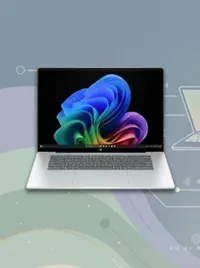
HP's OmniBook 5 series is a range of great everyday laptops. Our 14-inch OmniBook 5 14 (G1q) review showed they're designed to last, with great battery life and performance thanks to the Snapdragon X Plus chip that's powering things under the hood. This 16-inch variant is rated for 34 hours of battery life, which means in real-world usage, this device will get you through the day with no problems.
The star of this show is the 16-inch 2K OLED with touch, which is a 2560 x 1440 panel that offers inky deep blacks and great contrast thanks to that OLED technology. You don't often find OLED displays in laptops under $600, so this is an added bonus for sure.

It comes with 16GB, 32GB RAM, and 512GB SSD storage, and because a Snapdragon X Plus chip powers it, it also includes an NPU that makes it Copilot+ capable. That means you get access to Windows 11's latest advanced AI features, which are exclusive to Copilot+ PCs like the OmniBook 5 16.
It also has a great 1080p front-facing camera, which is excellent for video calls and attending meetings remotely. It has a large keyboard and trackpad, which are great to type on, and there's no number pad, which means the keys and trackpad are centered in the middle of the deck, just as they should be.
FAQ
Is the HP OmniBook 5 16 a Copilot+ PC?
Yes, this laptop is an official Copilot+ PC as it meets all the requirements to access Microsoft's exclusive set of AI features. It has a Snapdragon X Plus chip, which comes with an NPU that outputs more than 40 TOPS of power. This means it supports features like Windows Recall, Click To Do, and more.
How long does the battery last?
HP rates it for up to 34 hours of battery life, which means in real‑world use it easily lasts through a full day of work or streaming.
What makes the display special?
Unlike most laptops under $500, this one has a 2K OLED touch panel with deep blacks and high contrast — a rare find at this price point.
Who is this laptop best for?
It’s ideal for daily tasks, productivity, streaming, and light creative work. Thanks to the Snapdragon chip and OLED screen, it’s also great for media consumption.
Any downsides?
It’s not a gaming powerhouse — think light creative tasks and everyday use, not AAA gaming. Also, while the battery rating is huge, expect real‑world performance to be slightly less, depending on the workload.
Enjoy our content? Make sure to set Windows Central as a preferred source in Google Search, and find out why you should so that you can stay up-to-date on the latest news, reviews, features, and more.
More Cyber Monday 2025 - quick links
- All our TOP recommended Cyber Monday deals: Just the best
- Mini PC deals: up to 47% off tiny PCs
- GPU deals: early price drops on NVIDIA RTX before they go up
- Microsoft Surface deals: save up to $500 on premium PCs
- Xbox accessories: best deals on gadgets for your Xbox Series X|S and PC
- Gaming laptop deals: the best laptops for the best price
- Xbox controllers: our top picks for best controller deals
- ANC headphones: great Cyber Monday deals on the best ANC headphones
Even more Black Friday deals: - Dell deals: 13 deals from Dell.com that you shouldn't miss
- Best Buy: 34 hottest discounts on laptops, monitors, gaming, and more
- Walmart: 7 top laptop deals you shouldn't miss
- Samsung monitors: the best Samsung display deals we've found
- Retro gaming: handhelds, arcade machines, old school consoles, and more
- Gamer merch: Blizzard’s Warcraft, Overwatch, and Diablo IV collectibles
- Game keys: 10 PC game codes are even cheaper at Loaded (formerly CDKeys)
- Accessories: Even more PC accessories starting at $17

Follow Windows Central on Google News to keep our latest news, insights, and features at the top of your feeds!

