Gaming keyboards are a gigantic category, and for a good reason. Gamers could (and often do) settle for an office-centric keyboard, but upgrading to a purpose-built option from brands like Razer, ASUS, and many more can have real, lasting effects through a range of RGB-laden features.
Faster response times from advanced switches and profile-linked hotkey customization are just the start, so it can be a confusing adventure if you're picking up your first model. Thankfully, we've tested more gaming keyboards at Windows Central than we can count, and we have some recommendations.
Best overall gaming keyboard


Razer has dominated this list for years, and it does so with consistently great gaming keyboards. The latest Huntsman has a longer name than usual, especially with that 8KHz moniker at the end, but it's all about input accuracy. The Huntsman V3 TKL 8KHz "polls" your PC at 8,000Hz, rather than the usual ~1,000Hz you see on other keyboards, so there's no chance your keypresses will be mistimed or, worse, missed entirely.
Outside of that, it's generally carrying the same stellar build quality as Razer's predecessors, and the Huntsman has the best linear key switches the company has made to date. "Snap Tap" gives you a side-strafing edge in first-person shooters, and its benefits carry over into practically any genre you could think of. This is the best gaming keyboard you can buy right now — with an honorable mention for its "Pro" variant.
- Read our full Razer Huntsman V3 TKL 8KHz review
Best compact gaming keyboard
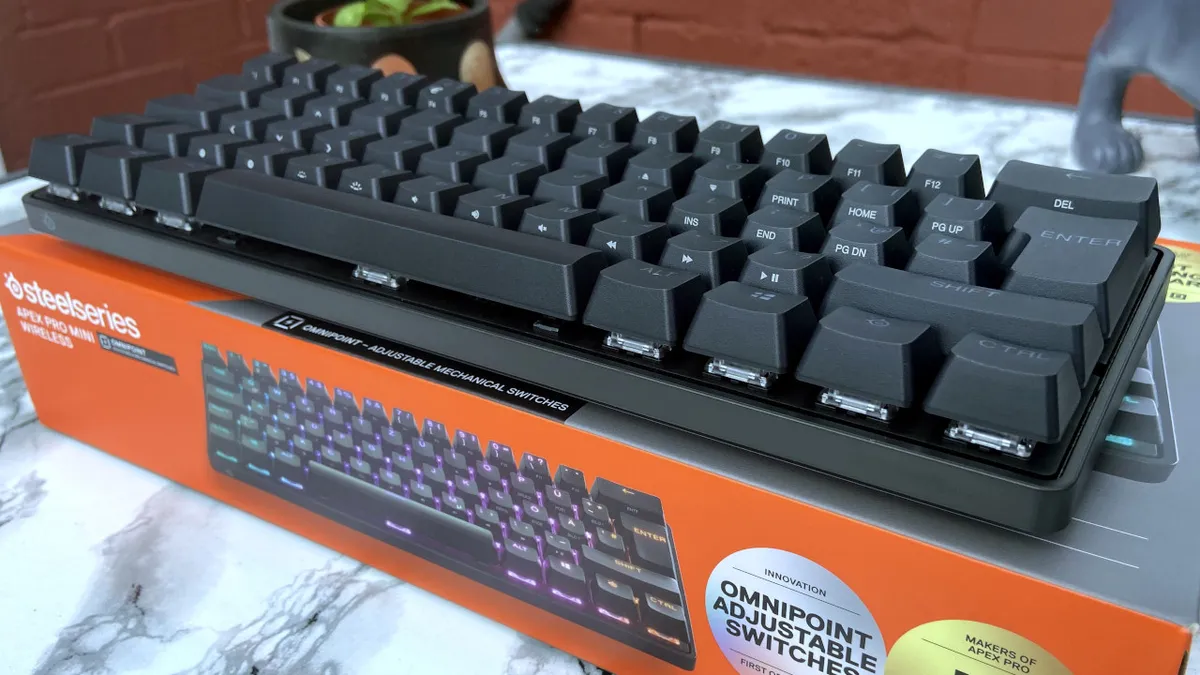
The Apex Pro Mini Wireless has been around since 2022, but it has served me well for years since I tested it. Compact, fast, and improved over time, SteelSeries still offers a great keyboard at an even better price since its launch. You get per-key RGB with plenty of customization in its pre-made profiles and even more in its companion app, alongside adjustable actuation for its linear switches.
You can even set up two actions for a single key, such as walking with a half press and sprinting with a full press. It takes some getting used to, and still feels like a bit of a gimmick, but there will be gamers out there who can make real use of it. It includes a USB cable, but operates wirelessly with its included dongle or via Bluetooth — though I definitely recommend the former.
- Read our full SteelSeries Apex Pro Mini Wireless review
Best split gaming keyboard

The Falcata will look bizarre at first glance, and that's because it really is quite unusual. However, a split design is geared towards gamers, since most commonly used keys are on the left side, particularly around W-A-S-D. ASUS also made this wireless, so you can position it in the most comfortable (if unorthodox) part of your desk.
To use both sides, you'll need to tether them together with a USB-C cable, so the right half will be somewhere nearby if you do. You'll also notice that it's quite expensive, despite dropping from MSRP since launch. Despite these downsides, there aren't many keyboards on the market like this, and the Falcata is a great example of how to do it right. Grab it on sale.
- Read our full ASUS ROG Falcata review
Most premium gaming keyboard

If we're heading into "money is no object" territory, then you shouldn't be surprised to see Razer on the throne. This 'Signature Edition' almost feels like it was built just to prove a point, but despite being something of a novelty, it's still one of the best gaming keyboards the company has ever made. It's like the Huntsman V3 Pro 8KHz on steroids.
You get Razer's Gen 2 Analog Optical switches with adjustable actuation from 0.1 to 4.0 mm, along with that 8,000Hz polling, but it's wrapped in an extravagant chassis that weighs a baffling 3.05 lbs (1.38 kg). I'm dead serious. This thing is a heavy, luxury spin-off of its high-end keyboard, built for the discerning gamer, with a limited run of 1,337 units. If you can find it, grab it.
- Read our full Razer Huntsman Signature Edition review
Honorable mentions

Much like Razer's Signature Edition, ASUS gave its ROG Azoth Extreme keyboard a 20th-anniversary makeover, and Cale Hunt called it "the best gaming keyboard I've ever used". However, unlike Razer's optical options, ASUS opts for traditional mechanical switches, offering the ROG NX Snow and a more "clacky" ROG NX Storm. It's another that'll leave you asking, "does this really need to exist?"
The answer is "probably not," but that doesn't stop it from earning a spot on this list. You'll find it for $599.99 at Best Buy, or perhaps lower if your local store ever decides to mark it down. It's literally a gold-plated keyboard that somehow feels even more "extra" than Razer's display, but it's backing up the posturing with a genuinely great keyboard.
- Read our full ASUS ROG Azoth Extreme Edition 20 review
What to look for when buying a gaming keyboard
When choosing the best gaming keyboard for you, it's usually best to start with a budget. How much are you looking to spend? A premium gaming keyboard, as we've highlighted, can run you as much as $600, which is an astronomical investment for any gaming setup. After that, it's all about form factor and features. How big do you want your keyboard to be? Does it need to be wireless? Are there any specific features you're looking for?
If that sounds overwhelming, that's understandable. For many serious gamers, the best all-around option is going to be the Razer Huntsman V3 TKL 8KHz (or its variants). The Huntsman line of gaming laptops is stellar, and it always has been, with attractive RGB-lit designs, and they often come with configurable profiles stored in on-board memory. They're generally just amazing keyboards across the, well, board.
FAQs
What are mechanical keyboards?
When you press a keycap on a mechanical keyboard, a stem compresses a spring, and two separate metal contacts touch to complete the circuit and let your PC know you've pressed a key. Mechanical switches generally come in linear, tactile, and clicky variants and are often interchangeable.
What does a keyboard's polling rate do?
Polling rate is measured in hertz (Hz) and indicates how many times per second your keyboard communicates with your PC, laptop, or other compatible device. The higher the polling rate, the less potential delay you'll see in-game after pressing a key.
How we test gaming keyboards
Every gaming keyboard is unique and therefore requires unique testing, but Windows Central reviewers make sure to hit the same pillars for every keyboard. We test the build quality and evaluate the overall design of the keyboard, including whether it includes RGB lighting or extras like wrist rests. We consider any unique features or special tech a gaming keyboard may have, like adjustable actuation.
We test any software the keyboard may use for customization or updates, such as its interface, features, and performance. We analyze the performance of the keyboard itself, such as its polling rate, how responsive it is, and the reliability and latency of its wireless connection (if relevant). Of course, we also test the keyboard's typing experience extensively, including when working, creating, or gaming. This includes the texture of keycaps, the type of switch used, the tactility and responsiveness of those keys, and more.
After all our testing is done, we assess if the keyboard's pricing matches the experience given and the existing flaws. All of this and more is part of the testing process for every gaming keyboard, but of course there's also the element of subjectivity — how much does the reviewer love the keyboard?

Join us on Reddit at r/WindowsCentral to share your insights and discuss our latest news, reviews, and more.