


Windows Central Verdict
With its adorable sci-fi aesthetic, solid speeds, and large 5TB of storage space, Seagate's Astro Bot Limited Edition Game Drive makes for the perfect PC gaming HDD. There are faster and less expensive options out there, but it reliably gets the job done while offering a standout design that's perfect for gifting to someone who plays a lot of classic games.
Reasons to buy
- +
Adorable robot design and space aesthetic
- +
5TB capacity provides room for 60+ games
- +
Compact shape doesn't take up much room on desk or in bag
- +
Fun blue lighting lets you know when the HDD is in use
- +
Makes for a great gift for an Astro Bot or sci-fi fan
Reasons to avoid
- -
A bit costly than a non-themed Seagate HDD
- -
Speeds are respectable, but not as fast as other options
Why you can trust Windows Central Our expert reviewers spend hours testing and comparing products and services so you can choose the best for you. Find out more about how we test.
Enjoy our content? Make sure to set Windows Central as a preferred source in Google Search, and find out why you should so that you can stay up-to-date on the latest news, reviews, features, and more.
Clair Obscur: Expedition 33 might have won Game of the Year during The Game Awards 2025, but the year before that — to many people's surprise — the single-player action-adventure and platformer game Astro Bot won Game of the Year.

This week: I've been alternating between playing Dave the Diver and Celeste on my Xbox Ally X.
This handed developer Team Asobi and publisher Sony Interactive Entertainment a major win within the gaming world.
Several months later, Seagate, the popular data storage company perhaps best known to you for its Xbox game drives, released a limited edition Astro Bot HDD (hard disk drive). It's designed specifically for PlayStation 4 and PlayStation 5, unsurprisingly, but also supports PC gaming.
I spent the last few days testing this HDD to see how well it performs with my PC desktop. Here's why it's a great collector's item, but might not be the best game drive for your PC gaming needs.
This review was made possible thanks to a review sample provided by Seagate. The company had no input nor saw the contents of this review prior to publication.
Astro Bot Limited Edition Game Drive review


As far as game drives go, this Astro Bot-themed HDD offers a very appealing design, especially for fans of the little robot.
• Price: $159.99 at Best Buy
• Capacity: 5TB
• Storage Drive type: HDD
• Ports: micro-B
• Dimensions: 21.5x0.81x122.5mm (0.85x3.19x4.82 inches)
• Weight: 266g (0.586 pounds)
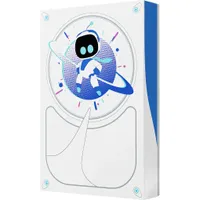
The front, back, and sides of the device showcase a theme that's very reminiscent of the game itself, complete with the titular Astro Bot standing with its hands on its hips in front of a planet. It all gives off a semi-Space Odyssey vibe, but with a cuter focus.
I particularly love the bottom of the device, where it's designed to look like Astro Bot's blue eyes are peeking out from inside the game drive.
But in addition to looking good, this small game drive offers 5TB — a large amount of storage space that can hold as many as 60 game files or more, depending on how large they are.
A small form factor that fits easily in an adult's hand makes this game drive extremely portable. Best of all, I didn't have to clear any space for it on my gaming desk thanks to its small size.
It has an MSRP of $159.99 and can be purchased at Seagate, Best Buy, and other tech retailers. Part of that price is certainly going toward the Astro Bot design, since you can get other non-themed Seagate 5TB HDDs for around $20-$30 less.

Seagate Astro Bot Limited Edition Game Drive review — WHAT'S IN THE BOX?
When I opened the box, I found the Astro Bot-themed HDD itself, a USB-A 3.0 to micro-B male cable, two manuals, a QR code for registering the device, a code for a 14-Day PlayStation Plus trial, and five adorable Astro Bot stickers.
Not stellar performance, but not a black hole either

As is typical with Seagate's external game drives, this one has a small light bar that glows when it's plugged in and being used.
Unlike the iconic green light from Seagate's Xbox HDDs (like the 2TB Xbox HDD Game Drive), this one glows blue to match Astro Bots overall white and blue theme.
I plugged this cute HDD into my gaming desktop and ran a few read and write speed tests on it.

On its first sequential run, it usually produced around a 148MB/s read speed and a 145MB/s write speed.
I never saw it dip lower than 140MB/s in terms of read or write, on the first test, but then it tended to trail off and go far slower by the third and fourth runs, which is typical of HDDs.
These aren't the very best results for gaming, but they also aren't horrible either. All in all, this device offers respectable transfer speeds that can certainly keep up with classic PC gaming or less graphically demanding titles.
Typically, you want to have at least a reliable 120MB/s read speed with a PC game drive. That said, some of the very best HDDs can hit a 200MB/s read speed or higher.
This device offers respectable transfer speeds that can certainly keep up with PC gaming.
In case you don't know, the best HDDs are far less expensive than the best SSDs (solid-state drives), but they aren't nearly as fast. Additionally, HDDs need to be handled more carefully since they are relatively fragile compared to SSDs. That's because HDDs use mechanical spinning platters that can be broken if there's a hard enough bump or impact.
Where a good gaming HDD can hit around 200MB/s, gaming SSDs can offer much higher speeds between 2,000MB/s and 7,000MB/s, and are the better option for modern AAA games. But if you simply intend to use the drive to play classic games or purely for storage, then an HDD is a great way to go.
That said, if you're willing to pay more, you might want to consider getting either an internal or external SSD for your gaming needs. But if you're on a budget, an HDD can get you far more storage space for a whole lot less.
Seagate Astro Bot Limited Edition Game Drive review: My final thoughts

✅You should buy this if ...
- You want a large amount of storage space but don't want to spend the high amount for an SSD
- You love Astro Bot and want an external hard drive for your game files
- You're looking for a compact hard drive that doesn't take up a lot of room but offers plenty of storage space
❌You should not buy this if ...
- You'd prefer faster storage solutions like an external or internal SSD
- You don't particularly care about Astro Bot or this design
Finding good storage solutions for your gaming setup can be tricky and costly. Thankfully, HDDs don't cost nearly as much as SSDs, and they are a great option for storing games and other files that you don't need fast or active access to, such as classic games or less-intensive modern games.
All in all, this limited-edition Astro Bot HDD offers an exceptionally fun design that's perfect for gamers or anyone who likes its chibi space aesthetic. Its compact shape means it doesn't require much room on your desk and is easy to travel with. If you're looking for PC game storage, it's definitely a product to consider, unless an SSD better suits your needs.

Save your PC game files in style with this cute Astro Bot-themed HDD. It offers 5TB of storage space and it glows blue when it's on, letting you know that it's in use.
Game Drive FAQ
How fast should an HDD be for gaming?
In general, a gaming HDD should hit at least 120MB/s read speeds, but some of the best options can hit over 200MB/s.
Is it better to have an SSD or HDD for gaming?
It depends on the kind of gaming you're doing. Most of the latest AAA games require an SSD since it can hit far higher speeds. However, an HDD is often good enough for classic games or less graphically intensive ones.
What are good SSD speeds for PC gaming?
SSDs these days can have a wide range of speeds, but for gaming, it's best if the game drive can hit at least a 2,000MB/s read speed. Some can go much faster as high as 7,000MB/s, but this really isn't needed in most cases.

Follow Windows Central on Google News to keep our latest news, insights, and features at the top of your feeds!

