


2025 was a rough year for Microsoft, at least when it comes to public perception. The tech giant was accused of pushing the "enshittification of Xbox, Surface, and even Windows itself" on purpose. Microsoft also drove away its defenders.
Windows 11, Microsoft's flagship OS, had a disastrous year full of bugs, half-baked AI features, and other issues.
While there's plenty of justification for doom and gloom, there are some good things on the horizon. An improved dark mode and some Microsoft Teams features won't be enough to fix what's wrong in Redmond, Washington, but there are some genuinely exciting changes on the way.
Love: Qualcomm Snapdragon X2 support

Back in September, Qualcomm unveiled its Snapdragon X2 Elite and X2 Elite Extreme chips. Those processors will rival Apple's M4 Max and promise better performance and greater efficiency than the first generation of Snapdragon X chips.
The new chips are built on a new 3nm process, which should help with efficiency. Qualcomm promised major improvements across the board, including performance and efficiency for the CPU, GPU, and NPU of the chips.
"That's exciting, but what does it have to do with Microsoft?" you may ask. Qualcomm is behind the new chips, but Microsoft is working on an update to Windows 11 that is a requirement for using a Snapdragon X2-based processor.
Windows 11 version 26H1 will be a full OS upgrade that will likely be limited to Snapdragon X2 devices at launch. As explained by our Senior Editor Zac Bowden, Windows 11 version 26H1 "exists specifically to support next-gen silicon."
We saw something similar with Windows 11 version 24H2, which was a requirement for the original Snapdragon X chips to function.
Love: Agenda view in Taskbar calendar flyout
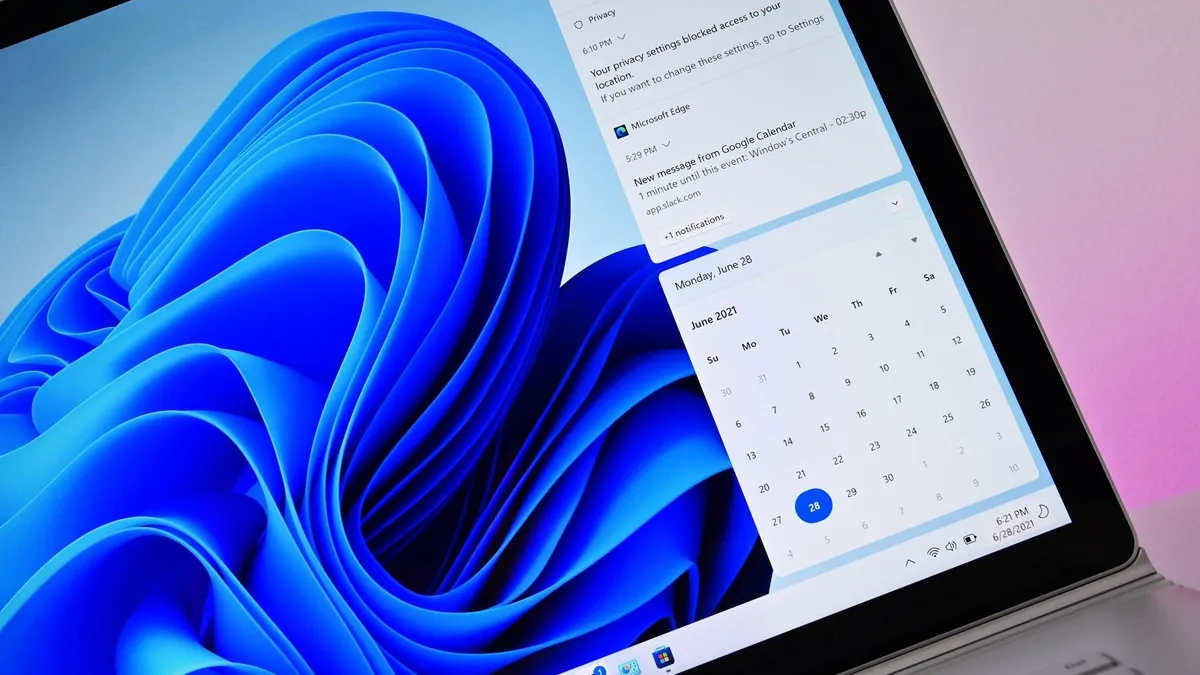
Windows 11 will gain a "new" feature in 2026 that will look familiar to those who used Windows 10. Soon, the Taskbar calendar flyout will be able to show upcoming events and meetings. That feature was available in Windows 10, but Microsoft did not include it when making Windows 11.
The calendar flyout on Windows 11's Taskbar is effectively a date checker. You can scroll through months, which is handy if you need to check which day of the week a certain date falls on. Other than that, it's useless.
In November, Microsoft announced Agenda view, which shows upcoming events and integrates with your calendar.
Basically every operating system has had similar functionality for years, including the OS that preceded Windows 11, but I suppose it's better late than never.
Love: Improved dark mode in Windows 11

Dark mode has been an inconsistent mess on Windows 11 since the operating system launched. Microsoft has improved things a bit over the years, but it seems the tech giant finally listened to feedback about unifying the look of Windows.
Microsoft began testing new dark mode elements late this year. Presumably, at least some of them will make their way to PCs in 2026. Our Senior Editor Zac Bowden, who has followed the development of dark mode as closely as anyone, highlighted the following parts of Windows that will get a revamp:
- The default and expanded state for copy, move, and delete dialogs
- Progress bars and chart views
- Dialogs for confirming states like skip, override, and file selection
- Multiple confirmation and error dialogs
- Run prompt window
Bowden added that Microsoft plans to bring dark mode to more interfaces throughout Windows 11 in the future.
Hate: Microsoft Teams sharing your location

Back in October, a Microsoft 365 Roadmap entry caused a stir. It turns out Microsoft is working on a feature for Teams that will use Wi-Fi network connections to pinpoint a person's exact location.
The feature will automatically update your work location when you connect to your organization's Wi-Fi and show which building you're in.
The feature will be off by default, but it still drew criticism when spotted.
For what it's worth, many organizations already have methods to see if workers are in a specific area or doing certain tasks. Teams will just provide another way to do so.
Honorary mention: Xbox Full Screen Experience

The Xbox Full Screen Experience started shipping this year, so it won't exactly be a new feature in 2026. That being said, the feature debuted on the Xbox Ally and we're only now starting to see the option to use the Xbox Full Screen Experience trickle out to more users.
The Xbox Full Screen Experience makes the Xbox app the main interface for games and services on your PC. It improves the gaming handheld experience and also reduces background programs on Windows, freeing up system resources for games.
A recent update added a toggle for the Xbox Full Screen Experience to the Lenovo Legion Go, Lenovo Legion Go S, and Lenovo Legion Go 2 (the experience started shipping to all gaming handhelds in November).
Microsoft is also pushing the Xbox Full Screen Experience to other form factors. You can also mimic the Xbox Full Screen Experience right now by using a third-party tool.

Do you think 2026 will be a good year for Microsoft and Windows 11? Let us know in the comments below!

Follow Windows Central on Google News to keep our latest news, insights, and features at the top of your feeds!

